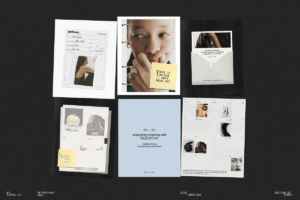
Stop leaving your achievements to chance. With the Case Study PowerPoint Presentation Template, turn every project outcome into a compelling narrative that captivates clients, impresses executives, and strengthens credibility. Designed for professionals who demand clarity, structure, and visual polish, this template equips you with a powerful framework to showcase real-world results with precision and purpose.
Why This Template Elevates Your Case Studies
Generic slide decks blur success. The right one highlights it. This template isn’t just a collection of slides—it’s a strategic storytelling engine. From defining challenges to demonstrating measurable results, every section is built to guide your audience through a logical, persuasive journey. Clean layouts, balanced spacing, and modern design elements ensure your message remains the focus—never lost in clutter.
Whether you’re a consultant pitching results to a client, a startup securing funding, a project manager reporting outcomes, or a researcher presenting findings, this template adapts instantly to your goal. It transforms complex data into digestible, visually intuitive stories that command attention and build trust.
Key Features That Power Your Presentation
Every element is engineered for speed, professionalism, and impact:
- Professional, Modern Design – Sleek, contemporary layouts with consistent typography and visual hierarchy. No outdated templates—just sleek, boardroom-ready slides.
- Full Editability in PowerPoint – Modify texts, images, colors, and logos in seconds. No design skills required. Works seamlessly with Microsoft PowerPoint and compatible software.
- High-Quality Visual Elements – Includes custom icons, clean data charts, and professional graphics that enhance clarity without distracting from content.
- Image Placeholders & Content Blocks – Easily insert project photos, team shots, or infographics. Pre-designed slots make content placement intuitive and consistent.
- Master Slide System – Apply consistent branding, fonts, and styles across all slides with a single click. Effortlessly maintain visual harmony throughout your presentation.
- Pre-Structured Case Study Flow – Follow a proven storytelling sequence: Problem → Challenge → Solution → Process → Results → Takeaways. Ensures logical flow and audience engagement.
- Multiple Slide Variants – Choose from different layouts for titles, data summaries, timelines, testimonials, and conclusion pages—all tailored for maximum impact.
Who This Template Is Built For
This isn’t a one-size-fits-all deck. It’s engineered for professionals who deliver impactful work and want to present it like experts:
- Consultants & Business Advisors – Showcase ROI, process improvements, and client transformations with undeniable clarity.
- Startups & Entrepreneurs – Present traction, user growth, and funding milestones in a way that inspires investors or partners.
- Marketing & Project Teams – Break down campaigns or product launches with compelling data and user insights.
- Academics & Researchers – Organize research findings, methodologies, and conclusions into publishable or defendable presentations.
- Internal Executives & Managers – Communicate outcomes, team contributions, and business progress to stakeholders with professionalism and confidence.
How to Use This Template Effectively
Follow these steps to turn your case study into a standout presentation:
- Define Your Objective – Are you convincing investors? Educating clients? Reporting to leadership? Know your audience first.
- Outline Your Journey – Break your project into key stages: Challenge, Strategy, Implementation, Outcome.
- Fill in the Content – Replace placeholders with real data, visuals, quotes, and metrics. Use the master slide to ensure consistency.
- Emphasize the Results – Highlight KPIs, growth percentages, cost savings, or user feedback to show impact.
- End with a Strong Takeaway – Summarize lessons learned or future steps—leave your audience with a clear message.
Deliver Impact—Without the Design Overhead
Great presentations don’t come from genius alone—they come from structure, clarity, and the right tools. This template eliminates the time-consuming guesswork of design. You focus on what matters: your story, your results, your audience.
With the Case Study PowerPoint Presentation Template, you’re not just making a slide deck—you’re building a persuasive case. You’re not just showing numbers—you’re telling a success story that sticks.
What’s Included in Your Download
- ✅ 18-PowerPoint Presentation Slides (PPTX format)
- ✅ Editable master slides with global styles
- ✅ 10+ customizable templates (Problem, Solution, Timeline, Metrics, Testimonial)
- ✅ 20 high-quality icons & visual assets (vector format)
- ✅ 5 sample data charts (bar, line, pie) with editable values
- ✅ Step-by-step guide: How to customize and present your case study effectively
- ✅ Bonus: 5 Presentation Delivery Tips (PDF)
Download the Case Study PowerPoint Presentation Template today and turn every result into a remarkable story.